Understanding how to use a cat tracker opens the door to ensuring your feline friend’s safety and well-being. With the right knowledge and tools, pet owners can effortlessly monitor their cats’ movements, activity levels, and health patterns, gaining peace of mind and valuable insights. This guide provides clear, step-by-step instructions to help you harness the full potential of your tracking device and foster a safer environment for your beloved pet.
From selecting the appropriate tracker to attaching it securely and utilizing its features effectively, this comprehensive overview ensures you are well-equipped to manage your cat’s tracking needs. Whether you’re a new owner or seeking to optimize your current system, understanding these essentials will enhance your ability to care for your feline companion confidently.
Overview of How to Use a Cat Tracker

Utilizing a cat tracker effectively enhances the safety and well-being of your feline companion by providing real-time location data and activity insights. These devices are designed to be user-friendly, ensuring that pet owners can easily set up and monitor their cats without technical hassle. The primary purpose of a cat tracker is to prevent lost pets, monitor outdoor excursions, and gather data on your cat’s habits, all contributing to a more informed and responsible pet care routine.
By incorporating a cat tracker into your daily routine, you benefit from peace of mind, quicker recovery if your cat strays, and a better understanding of your pet’s movements. Many trackers come equipped with GPS, activity sensors, and mobile app integrations, making it straightforward to keep an eye on your cat’s whereabouts and behavior from your smartphone or computer. These features empower pet owners to respond promptly to potential concerns and ensure their cats are safe and healthy at all times.
Setting Up a Typical Cat Tracking Device
Proper setup of a cat tracker is essential to ensure accurate location tracking and reliable performance. The process typically involves several straightforward steps:
- Charge the Device: Begin by fully charging the tracker using the supplied USB cable. Ensure the device has enough power to complete the initial setup and a few days of operation.
- Download the Mobile App: Install the dedicated app associated with your tracker on your smartphone or tablet. Most brands offer compatible apps available in app stores for both iOS and Android devices.
- Register and Pair the Device: Create an account within the app, then follow instructions to pair your tracker via Bluetooth or Wi-Fi as specified. This connection allows for initial configuration and synchronization.
- Attach the Tracker to Your Cat’s Collar: Securely fasten the device to your cat’s collar, ensuring it is snug but comfortable. Check the weight and size to prevent discomfort or interference with your pet’s natural movements.
- Configure Settings: Use the app to set up geofences (safe zones), alert preferences, and update the device’s firmware if necessary. Customize notifications to stay informed of your cat’s activity or if they leave designated areas.
Once setup is complete, monitor your cat’s location and activity via the app. Regularly charge the device and keep the software updated to maintain optimal performance.
Features and Functionalities of a Cat Tracker
Understanding the core features of your cat tracker helps maximize its utility. Here is a detailed overview organized in a clear table:
| Feature | Description | Usage Tips | Troubleshooting |
|---|---|---|---|
| GPS Tracking | Provides real-time location updates of your cat using satellite signals, allowing you to pinpoint their exact position on a map. | Ensure GPS is enabled in the app; perform regular signal checks, especially in areas with tall buildings or dense foliage that may interfere with satellite signals. | If location appears inaccurate, move to an open area to improve signal reception or recharge the device if the battery is low. |
| Geo-fencing | Allows creation of safe zones; alerts are triggered if your cat leaves these predefined areas. | Consistently update the geofence boundaries based on your outdoor environment; test notifications to ensure they work correctly. | Adjust alert settings if notifications are delayed or not received; verify device connectivity. |
| Activity Monitoring | Tracks your cat’s movements, rest periods, and activity levels, providing insights into their health and behavior. | Review daily activity reports to identify unusual patterns; set activity goals if supported by the device. | If activity data is inconsistent, recalibrate the sensors or restart the device; check for firmware updates. |
| Battery Life | Indicates remaining battery charge; influences how often the device needs recharging. | Charge the device regularly based on usage patterns; avoid letting the battery fully deplete. | If battery drains quickly, reduce usage of high-power features or replace the battery if replaceable. |
Selecting the Right Cat Tracker
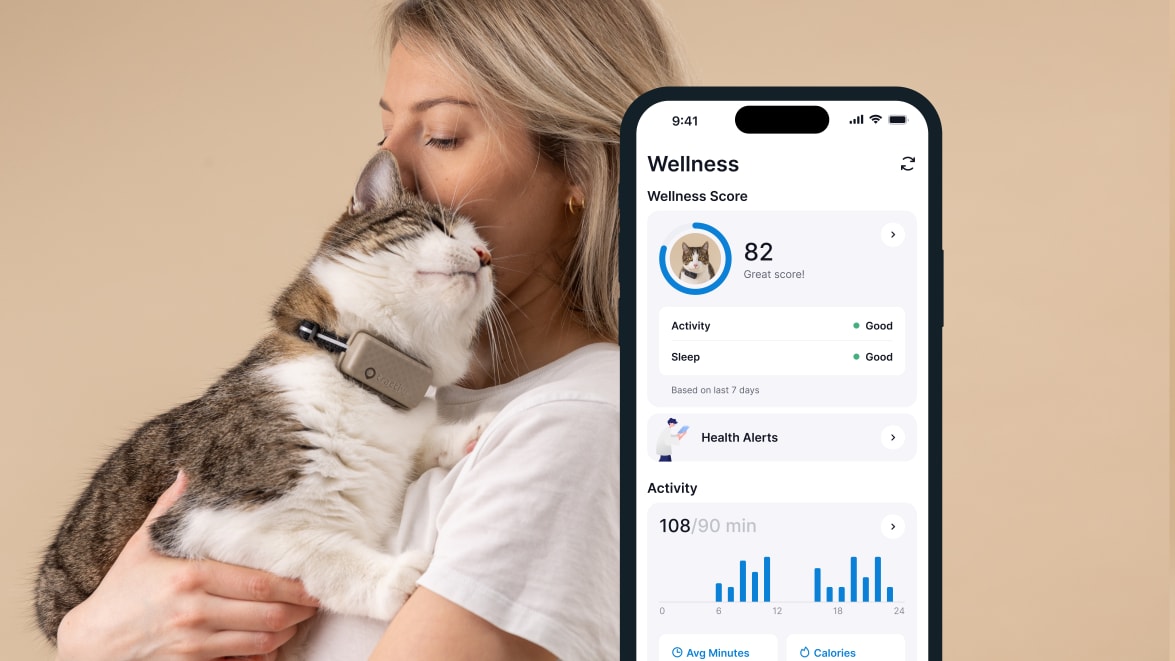
Choosing an appropriate cat tracker is a vital step in ensuring your feline companion’s safety and your peace of mind. With a variety of options available in the market, understanding their features, advantages, and limitations can significantly influence your decision. Selecting the most suitable device depends on factors such as your cat’s behavior, lifestyle, and the environment they frequent.
Different types of cat trackers are designed to cater to diverse needs, ranging from basic location tracking to advanced activity monitoring. Evaluating these options involves examining their core features, battery longevity, accuracy levels, and price points. Making an informed choice requires aligning the device’s capabilities with your cat’s specific habits and the typical terrain they explore.
Types of Cat Trackers and Their Features
The market offers several categories of cat trackers, each utilizing different technologies and offering unique benefits. Understanding these distinctions helps in selecting a device that best matches your requirements.
| Device Type | Features | Battery Life | Accuracy | Price Range |
|---|---|---|---|---|
| GPS Collars | Real-time location tracking, outdoor use, precise positioning | 12 to 48 hours, depending on usage | High (within meters) | $50 – $200+ |
| RF (Radio Frequency) Trackers | Short-range tracking, requires base station, suitable for indoors | Several months to a year | Moderate (within a few meters) | $20 – $100 |
| Bluetooth Trackers | Limited range (up to 100 meters), ideal for indoor use or backyard | Several days to weeks, based on battery capacity | Low to moderate | $10 – $50 |
| Hybrid Trackers | Combine GPS and RF or Bluetooth, versatile for indoor and outdoor use | Varies, usually 1-2 days | High (outdoor), moderate indoors | $80 – $250+ |
Each device type offers specific advantages aligned with different scenarios. GPS collars are best suited for outdoor cats with large roaming areas, providing high accuracy and real-time updates. RF trackers are more appropriate for indoor or confined environments where short-range precision is sufficient. Bluetooth trackers are cost-effective and simple but limited in range, making them ideal for backyard safety or indoor use.
Hybrid options offer a balance, often appealing to owners of cats that venture both inside and outside.
Criteria for Selecting a Suitable Cat Tracker
When choosing a tracker, consider critical factors such as your cat’s behavior patterns, typical environment, and activity levels. For cats that frequently explore outdoor areas, durability, GPS precision, and long battery life are paramount. Conversely, indoor cats may benefit from smaller, less obtrusive Bluetooth trackers with extended battery longevity. Additionally, environmental factors such as urban landscapes, wooded areas, or open fields influence the choice, as some devices perform better in certain terrains.
Key criteria include: durability, battery life, tracking accuracy, size and weight, and compatibility with your smartphone or other devices.
For highly active or adventurous cats, a device with high accuracy, robust build quality, and longer battery life ensures reliable tracking over extended periods. Cats that stay primarily indoors or in controlled environments may require trackers that are lightweight, easy to attach, and have a longer-lasting battery. Properly assessing your pet’s unique habits and environment will guide you toward selecting a device that provides optimal safety and convenience.
Attaching and Maintaining the Tracker on a Cat

Proper attachment and ongoing maintenance of the cat tracker are essential to ensure its effectiveness and your pet’s safety. A well-secured tracker not only provides accurate location data but also ensures your cat’s comfort and well-being. Regular maintenance routines help prolong the device’s lifespan and maintain optimal performance.Attaching the tracker correctly involves understanding the right placement on your cat’s collar and implementing safety measures to prevent discomfort or accidental loss.
Maintenance routines include cleaning the device, replacing batteries when needed, and updating its software to benefit from the latest features and security enhancements. Following these procedures ensures that the tracker functions reliably and remains a trusted tool in caring for your feline companion.
Proper Attachment Procedures
Ensuring the tracker is securely and safely attached to your cat’s collar requires careful attention to both fit and positioning. An improperly attached device can cause discomfort, fall off, or inhibit your cat’s natural movements.Begin by selecting a collar that fits snugly but comfortably around your cat’s neck—typically, you should be able to slip two fingers between the collar and the neck without restriction.
Attach the tracker to the collar’s designated attachment point, usually a sturdy loop or clip designed for this purpose. Make sure the device is positioned centrally and facing outward to maximize satellite reception and GPS accuracy.Safety tips are crucial to prevent accidental choking or injury:
- Use a collar with a quick-release buckle that allows easy removal if caught on objects.
- Regularly check the fit of the collar to ensure it isn’t too tight or too loose.
- Avoid attaching the tracker to collars that are already worn or damaged.
- Observe your cat after attaching the device for any signs of discomfort or irritation, and adjust as needed.
Maintenance Routines
Maintaining your cat tracker involves routine checks and updates to ensure continuous performance and safety. Regular maintenance not only prolongs the device’s lifespan but also guarantees that the tracking information remains accurate and reliable.Consider the following maintenance routines:
- Cleaning: Wipe the tracker’s exterior with a soft, damp cloth weekly to remove dirt, fur, and debris. Avoid using harsh chemicals or submerging the device in water unless specified as waterproof.
- Battery Replacement: Monitor battery levels regularly, especially if the device uses replaceable batteries. Replace batteries according to the manufacturer’s instructions, typically every few months, to prevent unexpected shutdowns.
- Software Updates: Connect the tracker to its companion app or software platform periodically to check for firmware updates. These updates often include security patches, new features, and performance improvements.
Tip: Setting reminders for routine maintenance can help ensure no aspect of the device is overlooked, keeping your cat safe and the tracker functioning optimally.
Illustrative Diagram Description for Correct Attachment and Positioning
To visualize proper attachment, imagine a schematic showing a close-up of a cat’s neck and collar. The collar is snug but comfortable, with a sturdy, quick-release buckle. The tracker is mounted centrally on the collar’s attachment loop, facing outward. The collar is positioned high on the neck, just below the jawline, to avoid slipping or choking hazards. The diagram highlights the following:
- The collar fitting securely yet comfortably around the neck.
- The tracker positioned flat against the collar surface, aligned to face outward for optimal GPS signal reception.
- The quick-release buckle ensuring safety in case of snagging.
- A label indicating the two-finger space between collar and neck for proper fit.
This visual would demonstrate that the device should not be too tight, which can cause discomfort or restrict breathing, nor too loose, which may result in loss or ineffective tracking. Proper positioning ensures reliable data collection while prioritizing your cat’s safety and comfort.
Using the Tracker’s Features Effectively
Maximizing the capabilities of your cat tracker ensures comprehensive monitoring and peace of mind. Familiarity with activating various features such as GPS tracking, geofencing, and activity monitoring allows you to tailor the device to your specific needs. Proper configuration and understanding of these tools enable quicker responses to your cat’s movements and health trends, fostering a safer environment.
Leveraging the full potential of the tracker involves not only activating its core functionalities but also customizing alerts and notifications. This proactive approach ensures you stay informed about your cat’s location and activity patterns, allowing timely interventions if necessary. Clear understanding of feature operation and settings adjustment enhances the overall effectiveness of your pet’s safety management.
Activating and Customizing Tracker Features
The process of activating key features such as GPS tracking, geofencing, and activity monitoring is straightforward but essential for ongoing welfare monitoring. Each feature serves a distinct purpose: GPS tracking provides real-time location data, geofencing sets safe zones, and activity monitoring tracks health and behavior patterns. Configuring these features correctly ensures reliable operation and meaningful alerts.
Within the tracker’s companion app or interface, you can customize alerts and notifications to suit your preferences. This includes setting specific thresholds for location deviations, activity level changes, or time-based alerts. Custom notifications can be configured to alert you via push notifications, emails, or SMS, ensuring you receive timely updates regardless of your location.
Tracking a Cat’s Location: Procedures and Troubleshooting
To ensure efficient location tracking, it is vital to follow a systematic approach and be prepared for potential issues. Below is an organized table detailing the typical actions, settings involved, expected outcomes, and troubleshooting tips to address common problems encountered during tracking sessions.
| Action | Settings | Expected Outcome | Troubleshooting |
|---|---|---|---|
| Activate GPS in the app | Enable GPS toggle, ensure device has a clear view of the sky, check for firmware updates | Real-time location updates available on the map interface | If location is not updating, verify device is powered on, check GPS signal strength indicator, restart the device and app, ensure firmware is up to date |
| Set up geofence boundaries | Define safe zones via the app’s geofence tool by drawing virtual boundaries around desired areas | Device alerts you when your cat enters or exits predefined zones | Adjust geofence size if notifications are too frequent or infrequent, check device connectivity, ensure notification permissions are granted in the app |
| Enable activity monitoring | Activate activity tracking features in settings, calibrate activity thresholds based on the cat’s age and behavior | Data on daily activity levels displayed within the app, helping identify health changes | If activity data is missing, confirm sensor contact points are clean, recalibrate the device, or restart the app to refresh data sync |
| Customize alerts and notifications | Access the notification settings in the app, select alert types, set preferred methods of notification | Personalized alerts for location breach, high activity, or low battery delivered as configured | If notifications are not received, verify app permissions, check for device connectivity issues, and review notification settings for conflicts or restrictions |
Monitoring and Interpreting Data from the Tracker
Understanding how to effectively monitor and interpret data collected by your cat tracker is vital for ensuring your feline friend’s health, safety, and well-being. The data provided by the tracker offers valuable insights into your cat’s daily routines, activity patterns, and overall health status, enabling you to make informed decisions and promptly address any concerns that may arise.The tracker’s data encompasses various aspects such as location history, activity levels, and sleep patterns.
Properly analyzing this information allows pet owners to detect early signs of health issues, observe behavioral changes, and ensure their cat remains within safe boundaries. Familiarity with reading and organizing this data enhances your ability to respond swiftly to any irregularities and maintain your cat’s quality of life.
Reading Location History, Activity Levels, and Sleep Patterns
Accurate monitoring begins with understanding the different data streams provided by the tracker. Location history maps your cat’s movements over specific periods, showing areas visited and frequented locations. Activity levels quantify periods of movement versus rest, often represented through activity scores or graphs. Sleep patterns reveal rest duration, frequency of waking, and sleep quality, which are indicators of health and comfort.To access this data, open the tracker’s companion app and navigate to the respective sections.
Location history is typically displayed on interactive maps that trace your cat’s recent movements. Activity levels are shown through bar graphs or line charts illustrating activity intensity throughout the day. Sleep data is commonly presented with timelines marking rest periods versus active phases, assisting you in recognizing sleep disturbances or irregularities.
Organizing Data Visually Using Charts and Tables
Organizing collected data in a clear visual format enhances comprehension and facilitates pattern recognition. The app often provides built-in tools to generate charts, tables, and summaries, allowing you to examine trends over days, weeks, or months.Using charts such as line graphs for activity levels over time helps identify peak activity hours or periods of inactivity. Tables summarizing daily sleep durations or location frequencies enable quick comparison between days and detection of deviations.
Establishing regular review routines ensures you remain aware of your cat’s behavior patterns, making it easier to detect potential health issues early. For example, a sudden decrease in activity or sleep disruptions might indicate discomfort or illness requiring veterinary attention.
Analyzing Data to Identify Patterns or Concerns
Interpreting data involves looking for consistent patterns or anomalies that could signal health or safety concerns. For example, if your cat normally exhibits high activity during morning and evening hours but suddenly becomes sedentary, it may indicate illness or injury. Similarly, frequent visits to unusual locations could suggest behavioral changes or stress factors.Regular reviews of location history can reveal whether your cat is venturing into unsafe areas or wandering excessively, which might raise safety concerns.
Tracking sleep patterns is equally important; a significant decrease in sleep duration or increased restlessness could be early signs of health problems such as pain or neurological issues.Real-life examples include noticing that your cat’s activity levels have dropped significantly over a few days, prompting a veterinary visit that uncovers an underlying illness. Conversely, tracking and noticing increased roaming behavior might lead you to investigate potential stressors or environmental changes affecting your cat’s mental health.
Using this data proactively ensures timely interventions that promote your pet’s long-term health and happiness.
Troubleshooting Common Issues

While cat trackers are designed for reliable performance, occasional issues can arise that may affect their functionality. Understanding how to identify and resolve these problems ensures your pet remains safe and your device operates optimally. Addressing common issues proactively can save time and prevent unnecessary frustration, allowing you to maintain a seamless tracking experience.
This section provides detailed guidance on diagnosing and solving frequent problems such as weak signals, battery drain, and connectivity disruptions. It also offers practical tips to enhance tracker performance across various environments, ensuring your cat’s safety is never compromised due to technical glitches.
Weak Signal or GPS Inaccuracy
Weak or inconsistent signals can hinder the tracker’s ability to provide accurate location data. This problem often occurs in areas with dense structures, underground tunnels, or remote rural locations where GPS signals are naturally weaker. Recognizing the signs of signal issues and knowing how to address them is crucial for reliable tracking.
- Ensure the tracker is positioned correctly on the cat, avoiding obstructions such as thick fur or collars that may interfere with signal reception.
- Verify that the tracker’s antenna is unobstructed and not damaged. Proper positioning can significantly enhance signal strength.
- Check if the tracker is in an area with high electromagnetic interference, like near large metal objects or electronic devices. Moving to a different location might improve performance.
- Update the tracker’s firmware and the accompanying app regularly, as manufacturers often release updates that optimize signal processing and accuracy.
- In cases of persistent weak signals, consider relocating the receiver or using additional network repeaters if recommended by the manufacturer.
Consistently tracking your cat in various environments involves awareness of environmental factors that can interfere with GPS signals. Being mindful of these can help maintain reliable performance and ensure continuous monitoring.
Battery Drain or Shortened Battery Life
Battery maintenance is essential to ensure your tracker remains operational when needed. Excessive battery drain can result from various factors, including frequent use of tracking features, environmental conditions, or device malfunctions. Recognizing signs of battery issues allows timely intervention to extend device longevity.
- Check the battery status regularly through the app to monitor remaining charge and identify abnormal drain patterns.
- Turn off non-essential features when not in use, such as live tracking or secondary sensors, to conserve power.
- Ensure the tracker is charged using the recommended charging accessories and avoid overcharging, which can degrade battery health over time.
- Store the tracker in a cool, dry place when not in use, as high temperatures accelerate battery deterioration.
- If the battery life diminishes significantly despite proper care, consider replacing the battery if the device permits or contacting customer support for options.
Implementing good charging habits and environmental considerations can greatly improve the device’s lifespan, ensuring consistent tracking capabilities for your feline friend.
App Connectivity Issues
Difficulty connecting the tracker to the app can stem from network issues, outdated software, or device malfunctions. Reliable app connectivity is vital for real-time updates and easy management of your cat’s location data. Troubleshooting these issues involves systematic checks and updates.
- Verify that your smartphone has a stable internet connection, either Wi-Fi or mobile data, as poor connectivity can hinder app synchronization.
- Ensure the tracker is within the recommended Bluetooth or Wi-Fi range, depending on the technology used, to maintain a steady connection.
- Update the tracker’s firmware and the tracking app to the latest versions to resolve known bugs and compatibility issues.
- Clear cache or data from the app if connection problems persist, and restart both the device and the app.
- Reinstall the app if necessary, and re-pair the tracker following the manufacturer’s instructions to establish a fresh connection.
Maintaining a consistent and stable connection involves ensuring your device’s software and hardware are up-to-date and optimal for your environment. Regular checks and timely updates help prevent connectivity disruptions during critical moments.
Troubleshooting Flowchart and Resolution Guide
Start with identifying the specific issue—signal, battery, or connectivity. For weak signals, check placement and environmental interference. For battery issues, monitor charging habits and replace batteries if needed. For app connectivity, verify network, update software, and re-pair devices. Follow the step-by-step process to isolate and resolve each problem efficiently.
| Issue | Symptoms | Possible Causes | Resolution Steps |
|---|---|---|---|
| Weak Signal | Inconsistent location updates, GPS error messages | Obstructions, environmental interference, outdated firmware | Relocate tracker, clean antenna, update firmware |
| Battery Drain | Rapid depletion of charge, device not lasting full expected duration | Excessive feature use, high temperatures, old batteries | Limit features, charge properly, replace batteries if needed |
| App Connectivity | Failure to sync or update location data | Network issues, outdated app/firmware, range limitations | Check network, update software, re-pair device |
Consistent tracker performance relies on regular maintenance, timely updates, and environmental awareness. By following these troubleshooting steps, users can ensure reliable operation, enhancing the safety and well-being of their cats at all times.
Tips for Maximizing Tracker Effectiveness
Ensuring optimal performance of your cat’s tracker is essential for reliable monitoring and peace of mind. Proper maintenance and strategic usage can significantly extend battery life, improve tracking accuracy, and prevent loss or damage of the device. Implementing best practices in these areas will help you get the most out of your investment and keep your feline friend safe and secure.Maintaining the longevity and accuracy of your cat tracker requires consistent attention to its power management, secure fitting, and routine upkeep.
By adopting some straightforward habits and precautions, you can ensure your tracker remains functional and effective over time.
Extending Battery Life and Ensuring Accurate Tracking
Battery life is a crucial factor in continuous tracking, especially during extended outings or when frequent data updates are needed. To extend the lifespan of your tracker’s battery and maintain accurate position data:
- Optimize tracking intervals by setting periodic updates instead of continuous monitoring, especially when your cat is indoors or in a low-risk environment.
- Deactivate non-essential features, such as high-frequency GPS or live streaming, when they are not required to conserve power.
- Charge the device regularly according to manufacturer recommendations, avoiding complete discharges that can reduce battery capacity over time.
- Keep the tracker firmware up to date, as updates often include battery optimization improvements and bug fixes.
Pro Tip: Using power-saving modes or toggling features based on your cat’s activity patterns can significantly extend battery life and reduce the need for frequent recharging.
Securing the Tracker to Prevent Loss or Damage
The physical security of the tracker is vital to prevent accidental detachment or damage, especially given the active nature of cats. Proper fitting and protective measures can greatly reduce these risks:
- Choose a sturdy, comfortable collar that fits snugly but not too tight, with the tracker securely attached to prevent slipping or accidental removal.
- Use waterproof and shock-resistant cases or covers designed specifically for pet trackers to shield the device from water, dirt, and impacts.
- Regularly inspect the collar and tracker attachment points for signs of wear or loosening, replacing or repairing as necessary.
- Ensure the tracker clip or attachment mechanism is robust and compatible with your collar type, avoiding makeshift solutions that might fail during active play or outdoor adventures.
Important: Always verify the fit and security of the tracker before taking your cat outdoors or leaving them unsupervised to minimize the risk of loss or damage.
Organization of Maintenance and Usage Tips
Maintaining your tracker involves a combination of routine checks and mindful usage. Organized and proactive practices can save time, prevent issues, and prolong device lifespan:
- Schedule regular cleaning of the tracker and collar, removing dirt, hair, or debris that can interfere with sensors or charging ports.
- Keep a maintenance checklist, covering battery charging, firmware updates, physical inspections, and feature testing.
- Store backup accessories, such as extra collars, charging cables, and protective cases, to ensure uninterrupted service in case of loss or damage.
- Document troubleshooting steps and contact information for customer support, enabling quick resolution of technical issues.
- Monitor your cat’s activity and tracker data periodically to identify any irregularities or signs of device malfunction early on.
Reminder: Consistent and thoughtful maintenance, combined with careful fitting and usage, guarantees that your cat tracker remains a reliable tool for your pet’s safety.
Final Wrap-Up
In conclusion, mastering how to use a cat tracker empowers you to safeguard your pet with ease and precision. Regular maintenance, effective utilization of features, and attentive data analysis can significantly improve your cat’s safety and health. Embracing these practices ensures a harmonious balance between technology and care, giving you confidence and reassurance in your pet’s daily adventures.